
In export, manufacturing, cross-border ecommerce, and after-sales support, product document translation is a daily workflow.
Customers need an English product catalog. Overseas distributors need a localized product manual. Engineering teams need installation instructions. Buyers need to verify specification sheets and test reports.
These documents are rarely plain text. They often contain tables, parameters, diagrams, labels, step numbers, safety warnings, and dense PDF layouts.
If you copy the text into a generic translator and paste it back manually, several problems appear quickly:
- Parameter tables shift out of place
- Product models are translated by mistake
- Units, materials, and certification standards become inconsistent
- PDF layout breaks
- Image captions no longer match the diagrams
- The same term is translated differently across pages
This guide explains how to translate product documents, what to watch for in manuals, specifications, and catalogs, and how BelinDoc Premium Translation can help preserve layout and improve delivery quality.
What is product document translation?
Product document translation covers all documents used to sell, deliver, install, operate, and support a product.
Common document types include:
- Product manuals: usage instructions, features, warnings, maintenance
- Specification sheets: models, dimensions, materials, power, performance, standards
- Product catalogs: product lines, selling points, images, selection tables
- Installation guides: procedures, parts lists, wiring diagrams, precautions
- Service manuals: troubleshooting, maintenance cycles, spare parts
- Test reports: test items, standards, results, conclusions
- Packaging labels: warnings, certification marks, storage conditions
- SDS / MSDS: chemical safety information, hazards, first-aid measures
The shared requirement is simple: the translation must be accurate, structured, readable, and faithful to the technical meaning of the source document.
Why generic machine translation is not enough
Generic machine translation works for short text, but product documents are delivery assets. A translated manual or specification sheet may be sent to customers, distributors, procurement teams, engineers, or compliance reviewers.
1. Terminology must stay consistent
Product documents contain repeated technical terms such as:
- control panel
- rated voltage
- inlet pressure
- stainless steel housing
- safety interlock
- calibration procedure
If the same component is translated in three different ways, readers may wonder whether the document is referring to one part or several parts.
For product document translation, consistency is often more important than elegant wording.
2. Models, units, and parameters must not be rewritten
Many strings in a specification sheet should remain unchanged:
- Model: BD-3200A, XH-12, M8 x 20
- Units: mm, kg, kW, MPa, Hz
- Materials: SUS304, ABS, PVC
- Standards: CE, RoHS, ISO 9001, IEC 60529
If these are changed accidentally, the translation may affect quotation, procurement, installation, or compliance decisions.
3. PDF and table layout can break easily
Product PDFs often include:
- Multi-column tables
- Text labels beside images
- Headers and footers
- Warning boxes
- Step numbers
- Exploded diagrams
- Parameter comparison tables
A plain text translator cannot preserve all of this structure. Rebuilding the layout manually after translation is slow and error-prone.
4. Safety warnings must not be weakened
Manuals and installation guides often contain:
- Warning
- Caution
- Notice
- Danger
- Must
- Shall
- Do not
These words define safety levels and obligations. A sentence like “must disconnect the power supply” should not be softened into “it is recommended to disconnect the power supply.”
Common product document types and translation priorities
| Document type | Common format | Translation priority |
|---|---|---|
| Product manual | PDF / Word | Steps, warnings, button names, image references |
| Specification sheet | PDF / Excel | Models, parameters, units, materials, standards |
| Product catalog | PDF / PPT | Product lines, selling points, image captions |
| Installation guide | PDF / Word | Procedure order, part names, installation conditions |
| Service manual | PDF / Word | Error codes, troubleshooting, spare parts |
| Test report | Standards, test items, values, conclusions | |
| Packaging label | PDF / image | Warning text, certification marks, storage conditions |
Different document types need different translation strategies. A catalog may need natural marketing language, while a specification sheet should be precise, restrained, and close to the source.
What to check when translating a product manual
Product manual translation is one of the most common product document scenarios.
A manual may include feature descriptions, installation steps, operating instructions, warnings, troubleshooting, and maintenance. It must be understandable to end users and technically reliable for support teams.
Keep step numbers and hierarchy
For example:
- Connect the power cable.
- Press and hold the start button for 3 seconds.
- Wait until the indicator turns green.
The order and numbering must stay intact. Steps should not be merged or reordered.
Keep component names consistent
Common terms include:
- power switch
- reset button
- USB port
- indicator light
- filter cartridge
- control knob
These terms should use stable translations throughout the manual.
Preserve the force of warnings
Safety sentences should remain direct and strong:
- Do not open the cover while the machine is running.
- The device must be grounded before use.
- Disconnect the power supply before maintenance.
This is especially important for machinery, electrical equipment, medical devices, and chemical products.
Keep captions and references aligned
Manuals often include references such as:
- See Figure 2
- Refer to Table 1
- As shown in the diagram below
After translation, figure numbers, table numbers, and page references still need to match.
What to check when translating a specification sheet
Product specification translation is about accuracy rather than style.
Specification sheets are used by buyers, engineers, distributors, and bidding teams. They usually include product parameters, dimensions, materials, performance, testing standards, operating conditions, and certifications.
Do not translate models and numeric parameters
These should usually remain unchanged:
- Product Model: BD-500
- Rated Power: 1200 W
- Protection Class: IP65
- Material: SUS304
- Operating Temperature: -10°C to 45°C
Translate field names and descriptions, not the model numbers, units, or values.
Keep units and ranges precise
For example:
- 5-10 mm
- 220 V / 50 Hz
- less than 0.5%
- greater than or equal to 95%
Range, threshold, and tolerance expressions must be checked carefully.
Table structure matters more than sentence fluency
In specification sheets, tables are often the most important part. Check that:
- Headers are preserved
- Rows and columns still match
- Parameters and units do not shift
- Merged cells remain understandable
- Notes still refer to the correct parameter
What to check when translating a product catalog
A product catalog is closer to a sales asset than a technical manual.
It should help overseas customers understand product lines, selling points, selection logic, and application scenarios.
Focus on:
- Product series names
- Category headings
- Image captions
- Selling points
- Application scenarios
- Selection tables
- Contact and company information
Catalog translation can be slightly more natural than specification translation, but it should not exaggerate the source text.
Recommended workflow for product document translation
Step 1: Prepare the source files
Check:
- Is it PDF, Word, Excel, or PPT?
- Is it a scanned PDF?
- Does it contain tables and image labels?
- Does it mix multiple languages?
- Is there an existing glossary or previous translation?
If the manual is scanned, OCR quality matters. Poor scans lead to more recognition and layout errors.
Step 2: Confirm the target language and usage
The best translation style depends on the audience:
- Customers: clear and natural
- Engineers: precise and complete
- Distributors: sales-friendly
- Support teams: accurate steps and troubleshooting
- Compliance reviewers: strict standards and warnings
Step 3: Build a glossary
Start with repeated product and component terms:
| Source | Preferred translation |
|---|---|
| filter cartridge | filter cartridge |
| control panel | control panel |
| rated voltage | rated voltage |
| protective cover | protective cover |
| operating temperature | operating temperature |
For real projects, replace the right column with your approved target-language terminology.
Step 4: Translate while preserving layout
The hardest part is often not translation itself, but restoring the document layout after translation.
For PDF manuals, catalogs, and specification sheets, use a document translation workflow that can preserve formatting instead of extracting only plain text.
Step 5: Review key pages
At minimum, check:
- Cover title and product model
- Table of contents
- Safety warning pages
- Parameter tables
- Installation steps
- Image labels
- Certification and standard statements
- Contact and company information
For customer-facing delivery, review key pages before sending the file out.
Using BelinDoc Premium Translation for product documents
If your product document is a PDF manual, specification sheet, product catalog, or installation guide, and you need to preserve the original layout, try BelinDoc Premium Translation.
It is especially useful when:
- The document will be sent to customers or overseas distributors
- The PDF contains many tables, images, and page elements
- Terminology must stay consistent
- You want to revise specific pages after translation
- You do not want to rebuild the layout manually
- Generic machine translation is not stable enough
Premium Translation focuses on the delivery quality of the entire document. It handles translation while keeping the structure closer to the original file.
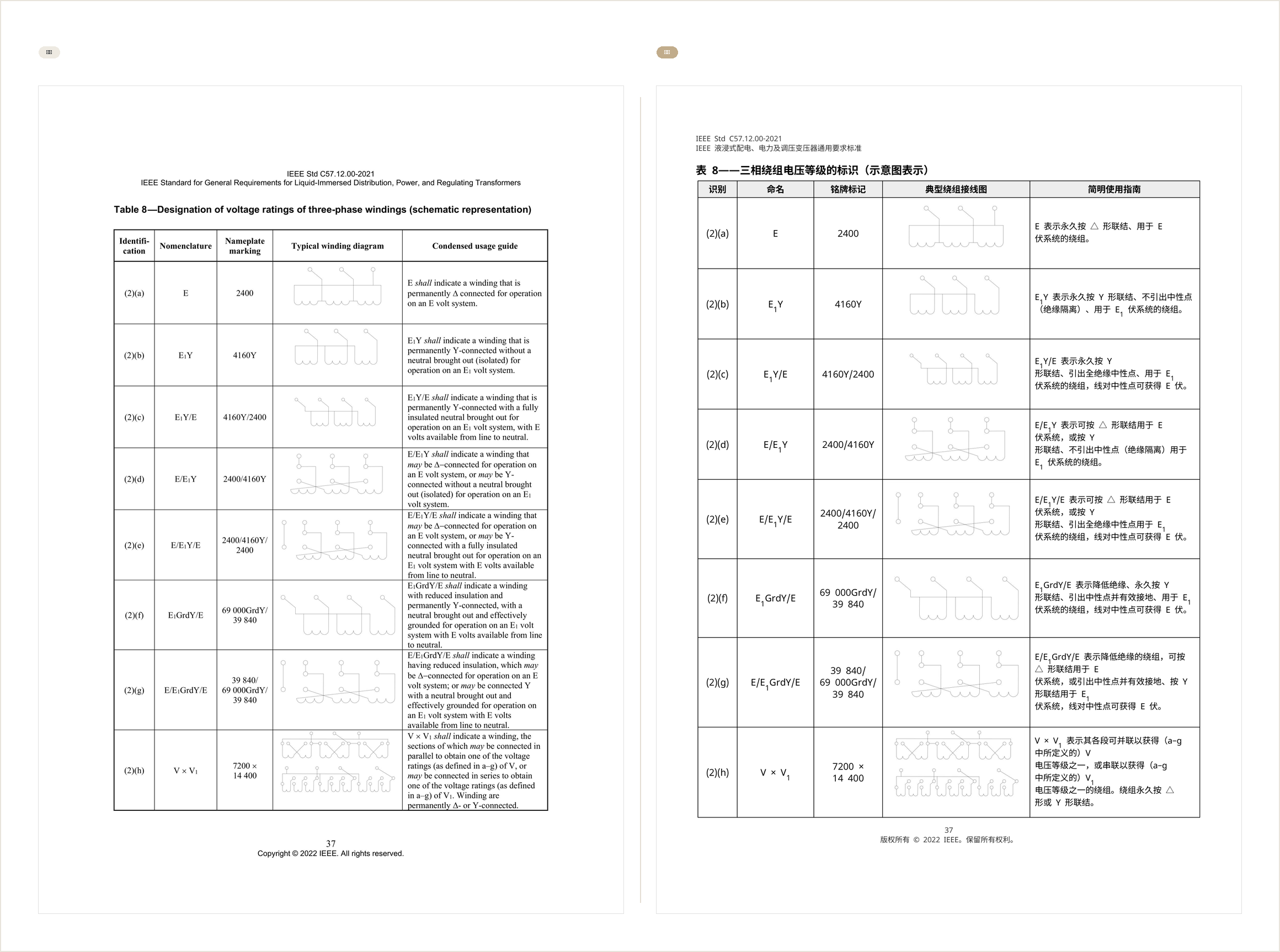
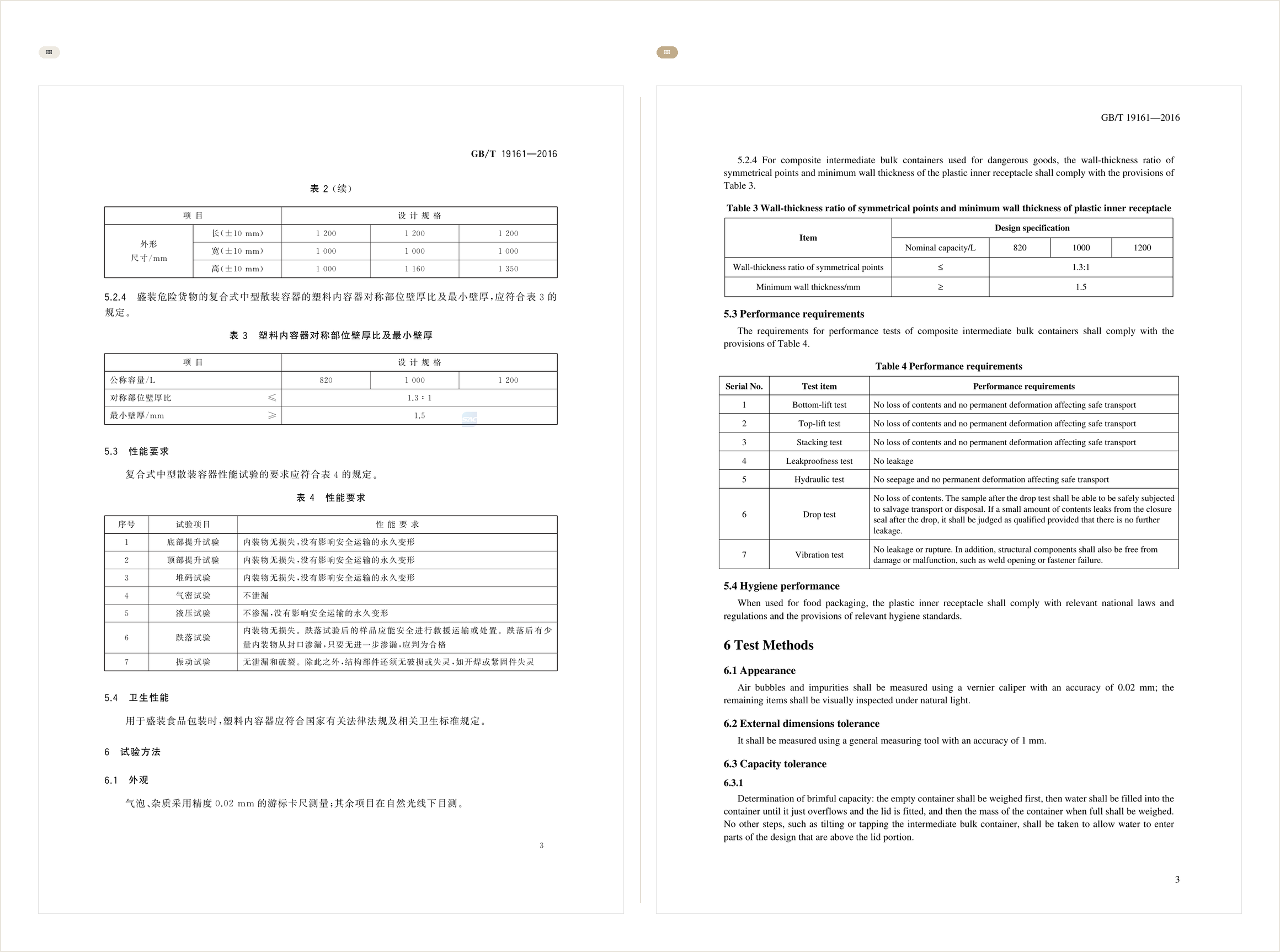
The following examples show translated PDF page results. For product manuals, specification sheets, and catalogs, layout, tables, image positions, and text hierarchy directly affect readability.
For a regular PDF, you can also start with the PDF Translator.
For Word or Excel files, use Word Document Translator or Excel Translator.
Which product documents are best suited for Premium Translation?
- Machinery manuals
- Electronic product user manuals
- Medical device instructions
- Industrial component specifications
- Home appliance installation guides
- Chemical safety documents
- Tender product documents
- Cross-border ecommerce product manuals
- Distributor training materials
- Multi-page PDF product catalogs
These documents are layout-heavy, terminology-heavy, and high-risk. The more formal the delivery, the more important formatting and consistency become.
FAQ
Should a translated product manual keep the original layout?
Yes. Images, step numbers, warning boxes, page references, and tables affect usability. A plain text translation is often not enough.
Can PDF product documents be translated directly?
Yes, but results depend on the PDF type. Text-based PDFs are easier to process. Scanned PDFs require OCR first.
Should product models and parameters be translated?
Usually no. Models, values, units, standards, and material codes should remain unchanged. Translate field names and explanatory text.
What is the difference between catalog translation and manual translation?
A catalog is more sales-oriented. A manual is more operational and safety-oriented.
Is AI suitable for product document translation?
Yes, but the workflow should check terminology, layout, tables, parameters, and warnings before formal delivery.
Can I revise a translated product document?
Yes. With BelinDoc Premium Translation, you can request page-level revisions after translation, such as unifying a term or improving a specific section.
Summary
Product document translation is not just about translating words. The goal is to keep the document accurate, complete, readable, and ready to deliver.
Manuals need careful handling of steps and warnings. Specification sheets need precise parameters and units. Catalogs need clear product structure and readable selling points.
If your product document is a complex PDF with tables and images, or if it will be sent to customers, use a workflow that preserves layout and supports revisions. You can start by uploading the document to BelinDoc Premium Translation, then review layout, terminology, and key pages before delivery.