
Have you ever experienced this frustration?
You find a vertical Japanese (Tategaki) PDF or an image of an ancient Traditional Chinese text. You feed it into a standard translation tool, but the result is absolute gibberish.
Or, maybe the text gets translated, but the paragraph order is completely scrambled, or the English text is plastered over the original characters, making it impossible to read.
You are not alone. This is a common pain point for anyone dealing with East Asian documents (Japanese, Traditional Chinese, Korean) where vertical formatting is still prevalent.
In this guide, we will dive into why translating vertical text is so technically difficult, and show you how to use Belin Doc—a specialized document translation tool—to solve vertical OCR issues and restore the layout in one click.
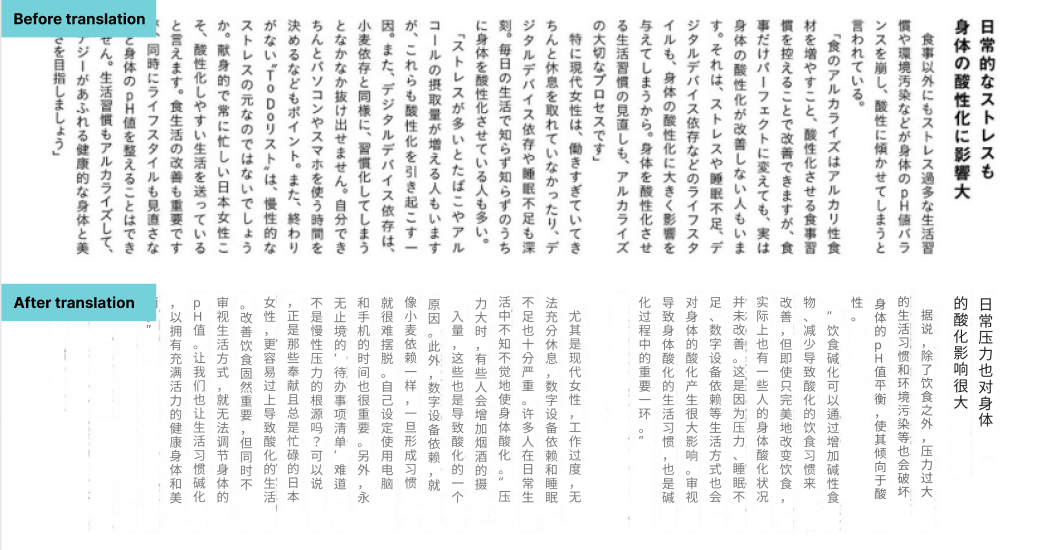
Can you translate vertical Japanese text? Quick answer
Yes — you can translate vertical Japanese (縦書き / tategaki) text, Traditional Chinese, and Korean (세로쓰기) documents accurately, but only with a document tool that reads columns top-to-bottom, right-to-left; general translators scramble the order.
Why standard tools fail, and how a vertical-aware tool fixes it:
- Reading order — most OCR reads left-to-right, so it chops vertical columns into gibberish. Belin Doc auto-detects vertical layout and reads right-to-left in the correct order.
- Layout — plain translators overlay text on the original; Belin Doc erases the source characters (in-painting) and re-flows the translation to horizontal for readability while keeping the page structure.
- The 3-step process — upload your vertical PDF or JPG/PNG, set source (Japanese / Traditional Chinese) and target language, then translate and download a file that looks like the original.
Why Do Standard Translators Fail at "Vertical Text"?
To understand the solution, you need to understand the technical limitations behind most tools.
1. The Natural Flaw of OCR Reading Order
Most OCR (Optical Character Recognition) engines are built for "Left-to-Right, Top-to-Bottom" languages like English. When they encounter vertical text (Top-to-Bottom, Right-to-Left), they often:
- Slice words incorrectly: They try to read vertical sentences horizontally, chopping characters into nonsensical fragments.
- Fail to recognize columns: They merge two separate vertical columns into one line, creating sentences that have no grammatical sense.
2. The Complex "Layout Reconstruction" Challenge
Translation isn't just about changing words; it's about putting them back in the right place. Vertical documents (like Japanese magazines, Manga, or academic papers) have dense and complex layouts.
Standard tools simply "overlay" translated text on top of the original. They cannot erase the original vertical characters or re-flow the text into a horizontal format (essential for English). This results in a messy document that looks like a patchwork of errors.
Scenarios: Who Needs a Vertical Text Translator?
Belin Doc’s vertical text engine is optimized for these high-demand scenarios:
- Japanese Academic Papers & Reports: Many Japanese academic journals, government documents, and financial reports still use traditional vertical formatting.
- Manga & Doujinshi Translation: Text in Manga speech bubbles is almost exclusively vertical. Standard OCR tools fail to extract this correctly.
- Historical Research: Researchers dealing with vertical scanned documents in Traditional Chinese or Old Japanese.
- Business Contracts (Taiwan/HK): Legal documents and formal invitations from Taiwan or Hong Kong often retain vertical traditions.
The Solution: How Belin Doc Handles Vertical Text Perfectly
Unlike the plain-text mode of Google Translate or DeepL, Belin Doc was born for "Documents." We have trained our algorithms specifically for the vertical structures of Asian languages.
Belin Doc's Core Advantages:
- AI Layout Analysis: Automatically detects if a document is "Horizontal" or "Vertical" and determines the correct reading order (Right-to-Left).
- In-painting (Background Erasure): When translating, our AI intelligently erases the original vertical characters. It then blends the translated text naturally into the document, making it look like the original file was written in your language.
- Format Support: Whether it's a multi-page PDF or a JPG/PNG image, we handle it perfectly.
Tutorial: Translate Vertical Documents in 3 Steps
Using Belin Doc requires no technical skills.
Step 1: Upload Your File Go to the Belin Doc homepage and drag & drop your vertical PDF or image file into the upload area.
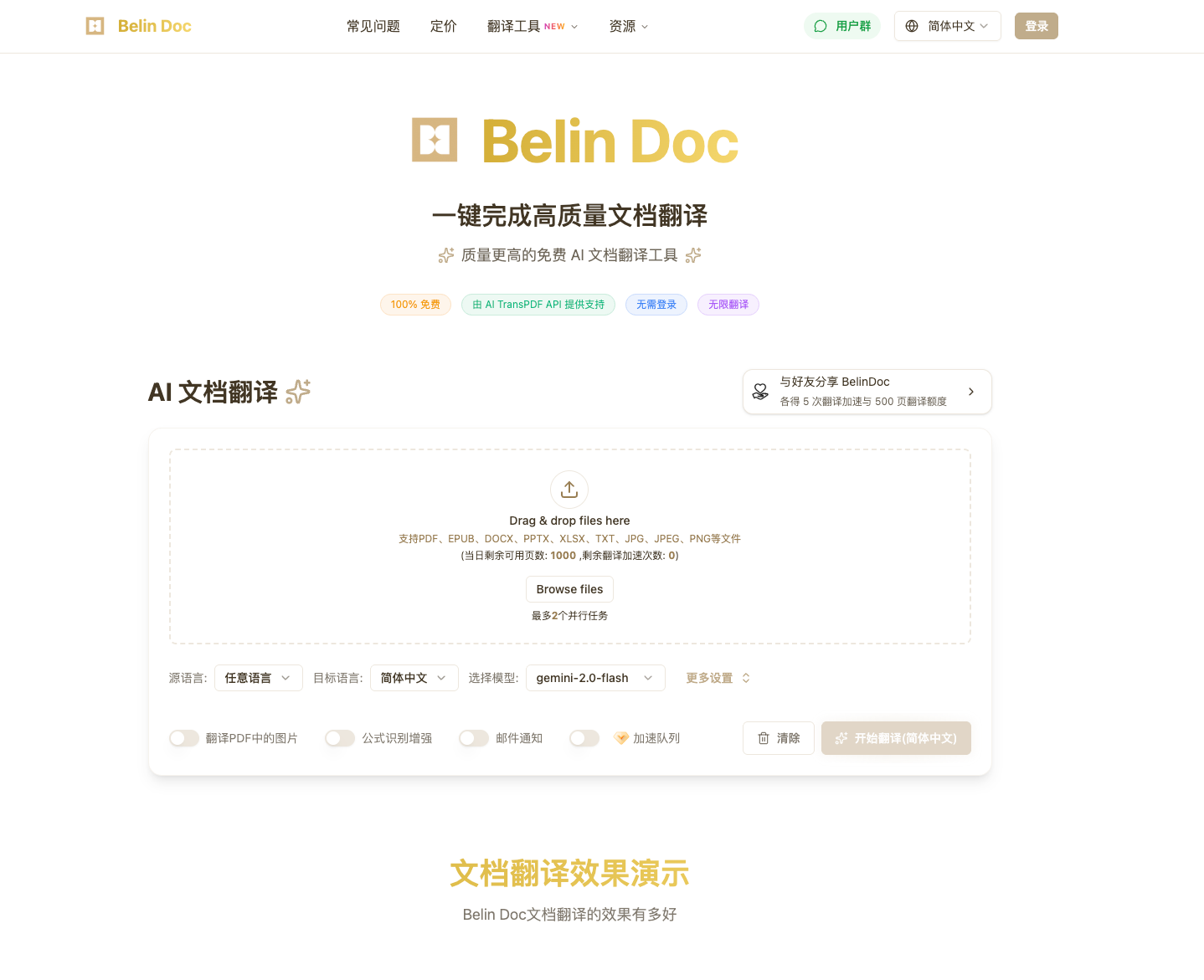
Step 2: Select Languages
- Source Language: Select "Japanese" or "Traditional Chinese" (depending on your file).
- Target Language: Select your desired output language (e.g., "English").
Step 3: Translate & Download Click Start. The system will automatically perform OCR, translate, and reconstruct the layout. In a few moments, you can download a translated document that looks exactly like the original.
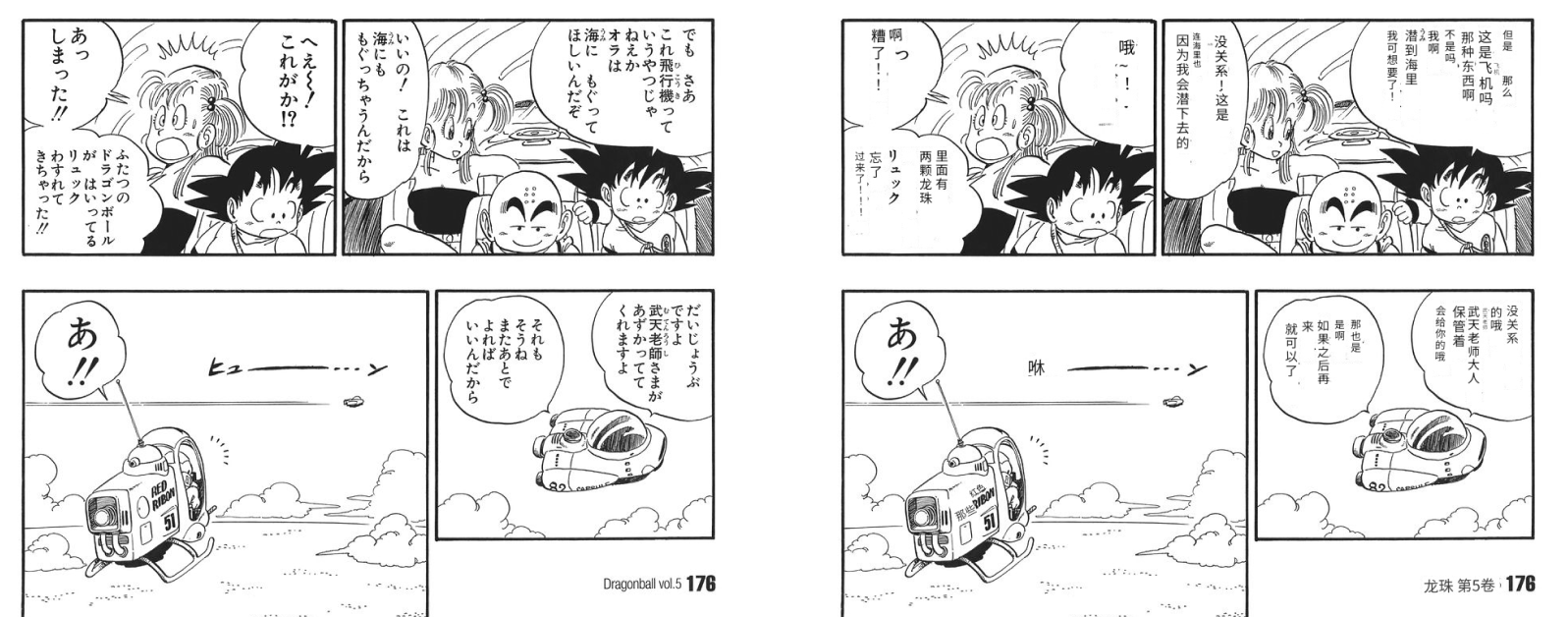
Belin Doc vs. Traditional Methods
| Feature | Copy-Paste to Google Translate | Mobile Camera Apps | Belin Doc Document Translation |
|---|---|---|---|
| Vertical OCR Accuracy | Very Low (Order often scrambled) | Average | High (Optimized for Vertical) |
| Layout Preservation | None (Plain text only) | Poor (Text blocks cover original) | Perfect (Looks like the original book) |
| Reading Experience | Fragmented, must compare with original | Image only, not editable | Immersive reading, downloadable |
| Best For | Short phrases | Street signs / Menus | Full documents, Books, Manga |
Frequently Asked Questions (FAQ)
Can Belin Doc translate Japanese Manga?
A: Yes! Our OCR engine is excellent at recognizing vertical text within speech bubbles, making it the perfect tool for reading raw Manga.
Is the translated document vertical or horizontal?
A: This depends on the target language. If you translate vertical Japanese to English, since English is a horizontal language, we convert the layout to horizontal for readability, while fitting it neatly within the original text boxes to maintain the visual structure.
Do you support scanned PDFs of ancient texts?
A: Yes. For scans that are not perfectly clear, Belin Doc includes image enhancement technology to significantly improve the recognition rate of vertical characters in old documents.
Conclusion
Don't let "vertical formatting" be a barrier to acquiring knowledge or enjoying content. Whether you are doing academic research, handling business operations, or simply trying to read a Manga that hasn't been localized, Belin Doc is your most powerful assistant.
Say goodbye to gibberish and broken layouts. Experience true immersive document translation.
👉 Click here to try translating your vertical documents with Belin Doc for free