
When translating PDF documents, many users face the same pain point: the translation is done, but formatting is messy, some areas are mis‑recognized, terminology is inconsistent, and manual fine‑tuning is required. To make results more controllable, formatting more stable, and editing more flexible, BelinDoc introduces a new Post‑Editing tool.
This article shows how to use the features and how they help you improve PDF translation quality.
Why did we build the Post‑Editing tool?
BelinDoc’s goal is constant: not just to translate documents, but to deliver content that’s ready to use.
Three needs stand out from user feedback:
- Unify terminology after translation, but manual searching is tedious
- Complex PDF areas (tables, footnotes, lists) break formatting and aren’t immediately usable
- Fine‑tune the translation like in Word so it better fits the context
We shipped smarter, more flexible post‑processing to solve these problems.
Core capability 1: Global search & replace (source and translation)
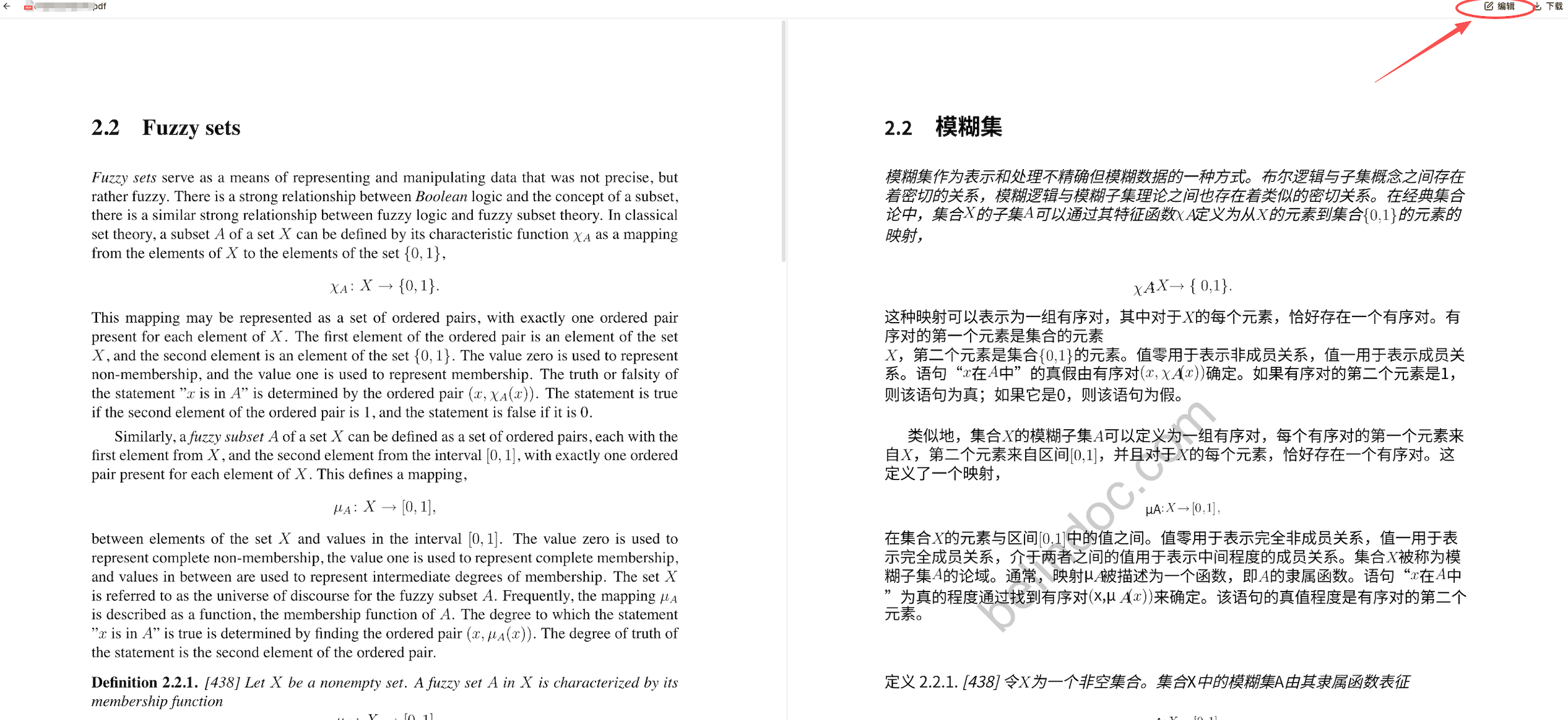
Step 1. Open preview and click “Edit”
In professional document translation, terminology consistency is a key quality metric.
In the editor you can:
- Find every occurrence of a word in the translation
- Replace it in one click with the required professional term
- Use two modes: search in source and search in translation
- Perform accurate matching across languages without regex
Typical scenarios:
- Replace “Artificial Intelligence” with “AI”
- Unify “Company A” → “Group A”
- Fix inconsistent wording in large‑scale machine translations
This saves significant time and makes the entire PDF more consistent and professional.
Core capability 2: Smart repair of problematic areas (format rebuild)
PDFs are inherently complex: multi‑column layouts, scans, nested text, hidden characters. If the structure is unstable after translation, readability suffers.
BelinDoc’s smart repair can:
- Automatically detect paragraph disorder, character offsets, and line‑break issues
- Rebuild the formatting of the selected fragment in one click
- Convert complex PDF blocks into a more editable and controllable structure
- Preserve fonts, styles, and hierarchy without breaking the page
Especially useful for:
- Formula style glitches
- Incorrect translation of company names or other proper nouns
- Wrong list markers
No need to re‑translate — select the problematic area and click “Repair formatting” to restore the most reasonable visual structure.
Core capability 3: Professional optimizations for PDF translation
Beyond search and repair, we improved overall usability:
- Editing: input is saved locally immediately
- Full preservation of PDF styles (size, color, spacing)
- More stable mixed‑language layout (especially English/Chinese technical docs)
How to use the Post‑Editing tool
Step 1. Upload the PDF you want to translate Choose the direction, e.g. “Chinese → English” or “English → Chinese”.
Step 2. After translation, enter “Edit mode”
You’ll see the translated layout aligned with the original.
Step 3. Use the actions in the right‑hand panel
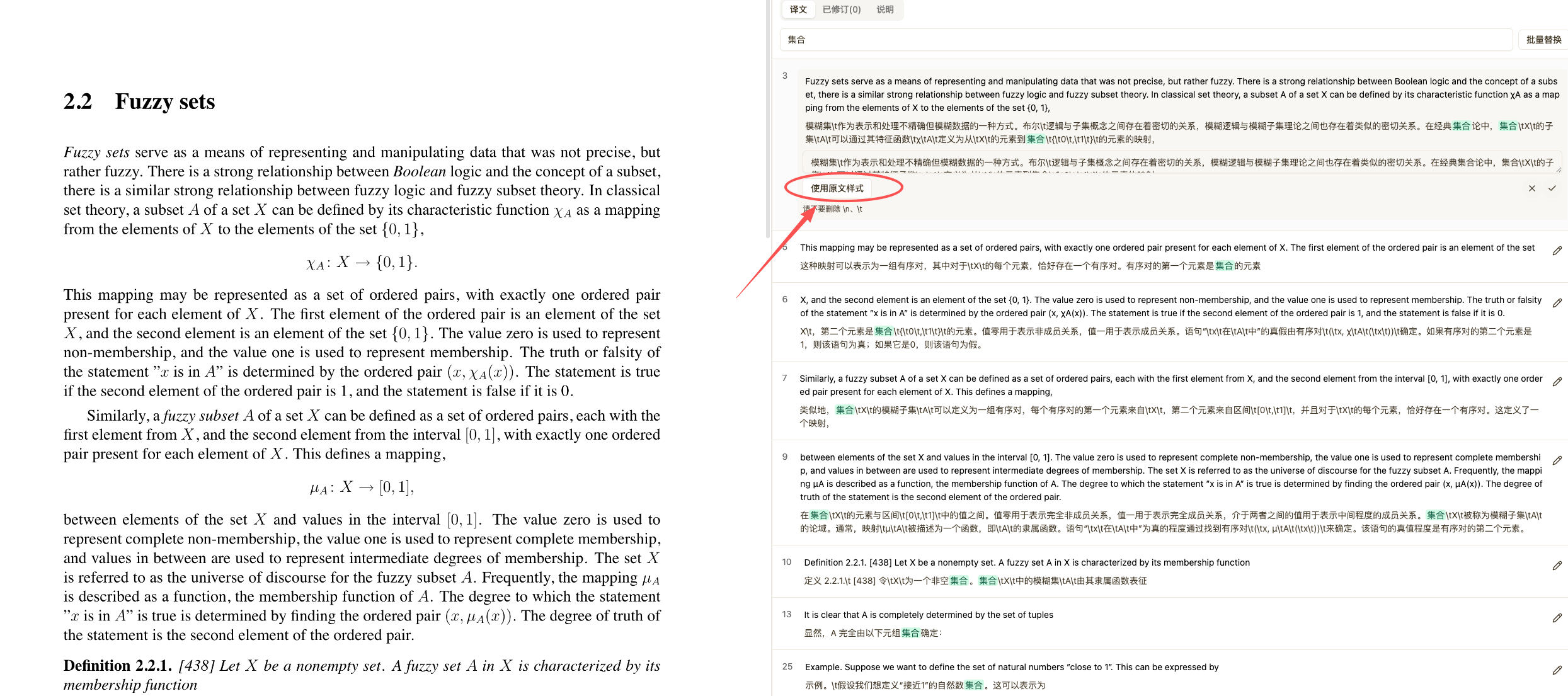
- Global search/replace
- Formatting repair
- Edit text blocks
- Export
Step 4. Download the final document after editing
No extra software or fees are required.
Important: keep the /n and /t markers during editing, otherwise formatting may break.
Saving the new version will overwrite the previous file; back up the source if needed.
What real problems does this solve?
✔ Need to unify terminology in a paper?
One‑click replacement ensures professional consistency.
✔ Contract formatting is broken?
Formatting repair restores clean, structured paragraphs.
✔ OCR in PDF produced gibberish?
Automatic rebuild of text blocks makes content readable.
✔ Local Word tools are cumbersome?
Edit everything in the browser and save time.
Why this is the strongest PDF translation post‑editing experience
To help more users find the right tool, we strengthened several key aspects:
- Preserving formatting in PDF translation
- Editable PDF translation results
- A document translation tool with Post‑Editing support
- Global search and replacement of translations
- PDF formatting repair
- Post‑processing of document translation (Post‑edit)
- Controllability for technical documentation translation
If you’re looking for a “PDF translation tool where the result remains editable”, BelinDoc is built for that.
In closing
We believe: the goal of translation isn’t “finished”, it’s “ready to deliver and use”.
With Post‑Editing, document translation becomes controllable, professional, high‑quality, and ready to hand off. If you want a more stable and professional PDF translation experience, try BelinDoc’s new features today.
Share your feedback — we’ll keep making document translation smarter and simpler.